Every update, in one place.
For far too long, our updates only lived in Discord. If you weren't in the server, you missed them. So we made this page. Every update gets posted here, newest first.
Saturday · 2026 The Thanksgiving update
Free Saturday builds with Creator Pro, a rebuilt mod marketplace, an Asset Generator, safer credits, Loom for Windows, and a long list of fixes.
Six free builds on Saturdays with Creator Pro
Every Saturday from noon to 12:45 p.m. Eastern, Creator Pro members can start up to six eligible mod builds in Creator Hub without spending credits. We call it Pro Hours. Outside that window, builds use credits as usual.
Creator Pro also includes 500 credits each month that roll over, Fast mode in Creator Hub, and one Warp environment to run your server by chat.
Make the art, then build the mod
The Asset Generator makes Minecraft-style item art and block textures on their own, outside mod chat. Saved creations go to Asset Library / Generated / Textures, where you can pick them in mod chat for the AI to use in your build. Texture generation unlocks after a credit purchase.
- Custom 3D models work properly again. When your mod needs a mob or a block with its own shape, the build now gets a complete model far more reliably.
- Sharper textures in Java mods. When the AI makes art for a Fabric, Forge, NeoForge, Paper or Spigot mod, item icons come out at a crisp 64 px so they stay sharp in your inventory, and block textures tile cleanly without visible seams. The price is the same as before.
Combine two mods
Pick two of your own finished Fabric mods and Combine builds one new mod with the content of both. Your two originals stay exactly as they are. The picker shows when each mod was made, so you can tell them apart even if they share a name. If you cancel, or the combined mod doesn't pass validation, your credits come back. If a combine can't start, the screen tells you why, for example when the two mods are on different Minecraft versions.
A new home for your mods
We rebuilt the mod marketplace from the ground up.
- One catalog for everything. Search comes first, with filters for version, loader, category, side, and now Free or Paid. The filters sit in a sidebar on desktop and a drawer on your phone.
- New art. Many community listings now carry fresh artwork, and the catalog opens with hand-picked featured mods.
- Mods we maintain. We've taken over a few of the most downloaded community mods and keep them working: Minecraft, But You Mine One Billion Blocks (rewritten so it works on servers), Mace v2, PVP Bot and God Spear.
- Better listings. Descriptions and changelogs show tables and formatting, even on a phone. Unfinished versions stay hidden, so Download always gets you a finished file. Paid listings tell you exactly what an unlock includes before you spend anything.
- Import from Modrinth. Already have a mod on Modrinth? Bring it into Player Games in a few clicks.
- 50 free credits for your first listing. Publish your first complete mod and you earn 50 credits. Listing settings show a checklist of what your listing still needs, and if publishing fails, we tell you what to fix.
- Sale emails. When someone buys a mod you listed, you get an email in your own language showing what that sale earned and your total so far.
- Your sales page. A new Your sales page in your dashboard lists every sale of your marketplace mods, what each one earned, and your lifetime total. The button in each sale email takes you there.
Open to every creator
In August, Modrinth decided that mods made primarily with AI can no longer appear in its public search, and some of our members' mods have since been delisted. Every platform gets to set its own rules, and we respect that. We just see it differently: new tools change how mods get made, not whether the person making them cares about the result.
The Player Games marketplace is open to every creator, however they build. What we screen for is safety. Every mod passes through our malicious-code detection, battle-tested across tens of thousands of generations, including by people actively trying to sneak harmful code through. Those attempts get stopped.
We've turned off publishing to Modrinth from Player Games. You can still import your existing Modrinth mods, and you can list your work here.
Builds you can count on
We check builds for problems a successful compile can miss. Here are the checks and fixes working for you now.
- New versions. Minecraft 26.3 builds use the newest Fabric, NeoForge and Forge releases. Cobblemon 1.8.4, Bedrock 1.26.63.1 (now the default for Bedrock add-ons) and Hytale 0.7.7 are ready to build for.
- Mods that work the first time. New checks catch more mods that compile but would crash in game or be refused by the loader, before they reach you. Forge and Minecraft 26.3 builds got updated knowledge of the new APIs, and NeoForge builds now test against the exact NeoForge line for your Minecraft version. Forge 26.3 mods that send custom packets, block fall damage or keep data through death now use patterns that work on 26.3.
- Fewer false alarms. Build checks no longer flag items or blocks as missing when they're only visual model variants.
- Faster starts. Cobblemon and modern NeoForge builds start faster because their build caches are ready ahead of time.
- Honest notes. The notes that come with each build describe only what changed, and say plainly when a texture couldn't be generated.
- Experiences checked every time. If the check can't run, the build is cancelled and your credits come back, and a pack that crashed at launch can no longer be installed by mistake.
- Faster Experience checks. Experiences that launch cleanly are now confirmed in about a minute, instead of being held until a timeout and wrongly marked as crashed. Packs that launch are no longer marked as crashed by a later check.
- Tested facts. Mod pages now show what happened when we ran the mod on our own test server: how long the server took to start, its peak memory and the file size. Flashback inventory addon, for example, started in 25 seconds with peak server memory of 1,012 MiB. You can see tested facts on 162 community mods.
- Clearer status. Builds that skip the planning step no longer look stuck waiting for your answers, and a version marked Preview in the picker now says Preview instead of Latest.
- Bedrock removals finish. Bedrock add-on updates that remove items you asked to remove now finish instead of failing at the end.
Your credits are safe with us
A lot of this month's work went into the things you never want to think about.
- If a browser game build times out, your credits come back automatically.
- If a skin or server image you paid for doesn't arrive, your credits come back automatically.
- Pressing Generate again after a dropped connection can't charge you twice, the image tools can't bill the same request twice, and a Pixelmon version we don't offer is refused before you're charged.
- Credit purchases can't be lost or counted twice. Card and PayPal payments that went through but didn't finish are recovered and credited. Saved PayPal top-ups work again, and if PayPal declines or refuses a payment, we tell you straight away whether you were charged and what to do next.
- Credit purchases are checked against the price and credit amount you were quoted, including valid discounts.
- After you buy credits, your balance shows up right away instead of sometimes staying blank until you click around.
- If your saved payment method can't be charged in one click, such as Pix, a USD credit top-up now sends you to Checkout instead of failing.
- Players in China can now sign up in Chinese with email first, start with a 3.99 USD Alipay starter pack, and buy credits with Alipay at checkout.
- Welcome credits arrive reliably once you add a payment method.
- A heads-up before you build. If your balance is below what a build usually costs, we tell you before you start. New accounts are pointed to their one-time 150 credit starter grant first.
- If you have no payment method on file, remixing or porting a mod now takes you straight to your free starter credits instead of a button that couldn't start.
- Claiming your free starter credits is quicker: the card form comes first, the save button stays on screen on every device, you only see payment options available where you are, and the form says plainly that nothing is charged until you choose to buy.
- Your account is better protected. Loom's sign-in is now tied to your website session, your build history and changes are visible only to you, and files you attach to a build can only be reused by you.
Loom for Windows
Loom, our desktop app, got a big update.
- Loom now speaks six languages.
- Import and export Modrinth modpacks (.mrpack), with your configs, resource packs, shaders and worlds.
- Pick your Minecraft skin and cape with a 3D preview.
- Play in Loom from Creator Hub opens your mod straight in Loom.
- Browser game pages have a Play in Loom button too, so you can launch a browser game in Loom on your Windows PC. If Loom isn't installed yet, the page points you to the download.
- Play in Loom now goes straight into the game, and a new click is no longer stuck behind an earlier one, even if Loom closed before that game finished loading.
- A new Play home lets you pick up where you left off.
- Local test servers on Minecraft 26.x let you straight in as an operator.
- Loom keeps you signed in through brief outages, and starts on Windows PCs where it failed before.
Player Games in six languages
Player Games is now available in six languages, on the site and in Loom, and most recent pageviews of our site came from outside the US. Wherever you're building from: thank you. Obrigado. Gracias. Danke. Merci. 谢谢.
Game SDK for browser games
Use the Game SDK to add controls, pause, and local saves to your browser games.
Also shipped
- Fixes and features reach player.games as soon as they pass our checks, with no wait for a manual release.
- Generated skins preview as a rotatable 3D player, and the skin library shows each character from the front.
- The prompt guide has copyable before-and-after prompts, and 15 guides were refreshed with current screenshots and clearer install and testing steps.
- Build-ready emails are redesigned: they show your mod's own art, fit any screen, and point Minecraft mods to Loom. Mods named from your description now get their full name instead of one cut off mid-sentence.
- Mod pages load faster for visitors, and the home page loads lighter. Pages also send less unused translation data to your browser while keeping the same content.
- The Creator Hub game chooser shows all five games side by side.
- Typing or pasting quickly into the Creator Hub prompt box no longer crashes the page.
- If you sign up in the middle of starting a build, your prompt is kept and the build carries on, and signing in brings you back to the studio. New creators no longer hit a silent error in the studio right after signing up or signing out.
- Opening a saved dashboard link while signed out now brings you back to that page after you sign in.
- Warp shows whether it's connected to your server and no longer sends the same reply twice.
- Linking Discord explains when your Discord account is already linked elsewhere, and our Discord bot now recognizes accounts that signed up with Discord.
- When a build or remix is blocked by our VPN check, you're told why.
- Clearer messages when an upload is too large or a file type isn't allowed, or when you don't have enough credits for an unlock.
- The credits button in the header always opens Purchase Credits.
- Pages you leave open during an update keep working instead of failing on your next click.
- Broken links on translated pages show a normal "not found" page instead of a server error.
- Mod descriptions no longer crash on older iPhones and iPads (Safari before 16.4).
- Downloads start even in private browsing or with site storage turned off, download buttons keep working when your browser translates the page, and Creator Hub works in browsers that block storage.
- Listings themed on real-world abuse are kept off the public marketplace.
- Pixelmon add-on downloads point you to the official Pixelmon download page.
- The mod editor stays smooth while you type.
Saturday · 2026 Halloween in Creator Hub
Scary enough and your build is free. Plus Haunted Chests, a one-day mini game that pays credits.
The Spook Meter
Describe a mod in Creator Hub and a needle under the prompt box shows how scary it would be to play, from 0 to 100. Hit 70 or higher on October 31 and that build is on us, up to three free builds for the day.
The needle reads the mod, not the words. A pile of scary adjectives scores nothing. A creature that hunts you, a base that changes while you sleep, a sound that gets closer when you stand still: that is what moves it. Under 70, it tells you the one thing that would make it scarier, so keep rewriting until it crosses the line.
Haunted Chests
Twelve chests, six mobs, two of each. Open two chests a turn. If the mobs inside match, the pair is yours and it pays credits. Catch all six pairs within ten turns for a bonus on top.
You get three games on October 31, Eastern time, and up to 30 credits for the day. Playing is free: nothing is ever taken from your balance.
Look for the pumpkin tab on the right edge of Creator Hub. It shows up the day before so you know it is coming.
Friday · 2026 The spooky update
Halloween mobs, Creator Pro, a texture studio, launch-tested Experiences, and Arcade games in Loom.
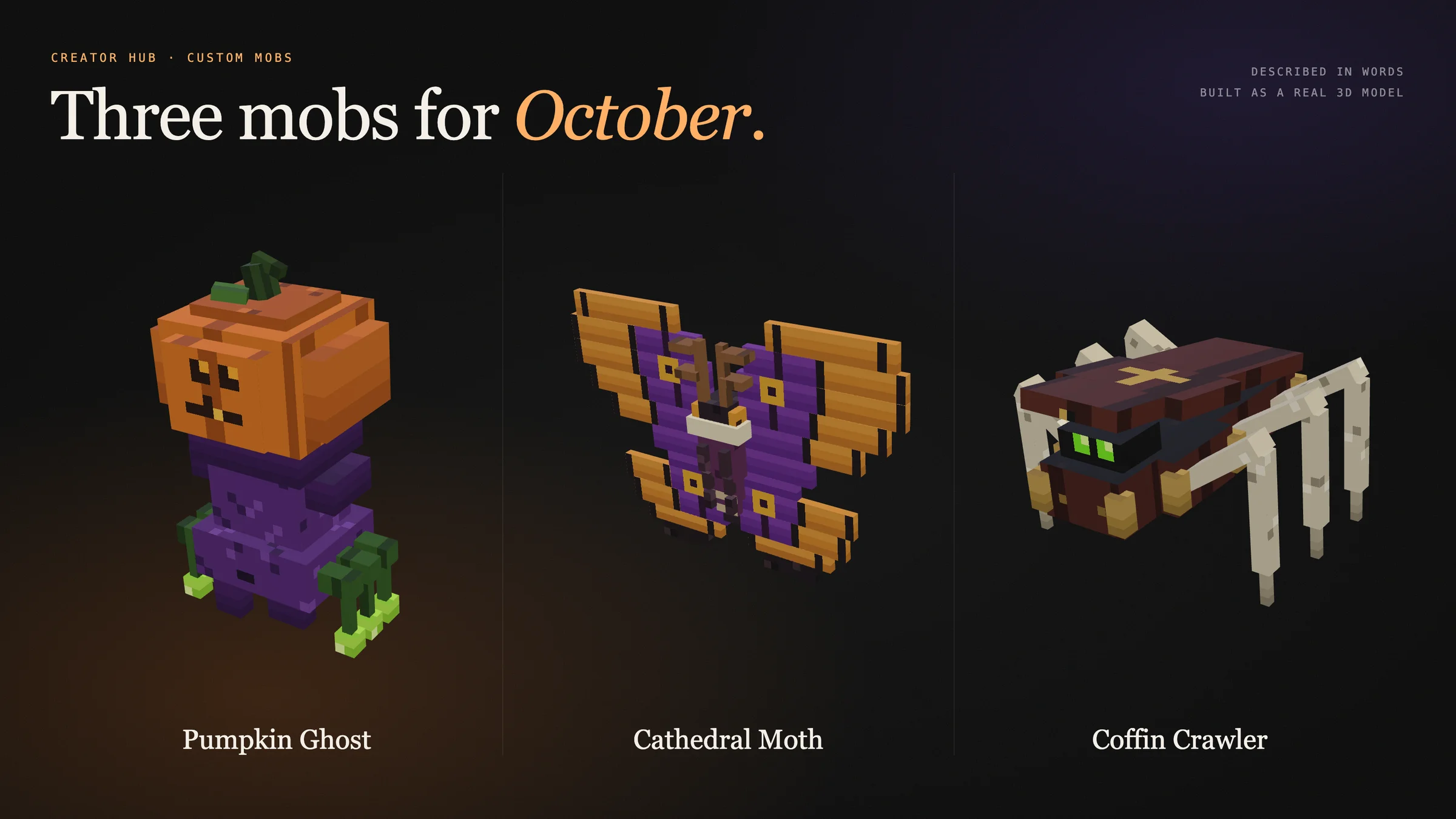
Halloween mobs
Describe a mob in Creator Hub and it gets built as a real 3D model with its own texture, ready for your mod. The Pumpkin Ghost, Cathedral Moth and Coffin Crawler above each started as a few lines of text. October is the month to make yours.
Creator Pro
Creator Pro is an agent you chat with. Walk it through your idea, attach your files, and it runs the builds in Creator Hub for you. Every project gets its own chat, saved for when you come back. Creator Pro is open to everyone who has bought credits at least once.
Texture studio
Describe a block or item texture, choose which faces share it, and preview it before you download. You get the PNG files plus a Java Edition block model. Sample layouts are free, and AI textures unlock after your first credit purchase.
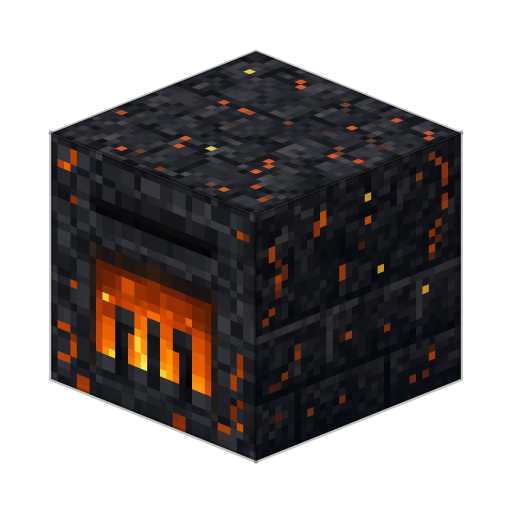 An ember furnace block made in the texture studio.
Experiences packs are launch-tested
Every new pack now launches in a real Minecraft game and on a real server before you play it. If either one crashes, the pack page shows you the crash log and the free crash patch. We also fixed packs that shipped without the libraries their mods need.
Arcade games in Loom
Arcade games now run in Loom, and friends on the website and friends in Loom join the same room.
Player Games in your AI app
Connect ChatGPT, Codex or any app that supports MCP to
https://mcp.player.gamesand build mods without leaving the chat. Mods made there now get real names based on your request.Also shipped
- Cobblemon 1.8.1 is the new default for Fabric and NeoForge. Older versions stay selectable.
- Bedrock add-ons build for 1.26.52.
- Changes to a mod now build for the version and loader the mod was made on.
- Forge 26.2 builds no longer time out, and Cobblemon 1.6.1 builds no longer fail.
- Fabric server-only mods with custom items no longer stop your friends from joining.
- A new gallery of mobs and blocks made in Creator Hub: Objects.
Earlier updates
Everything before this page was announced in our Discord.
Older updates are still there in the announcements channel. Discord is also where to go if something breaks: open a ticket and we'll take a look.
Join our Discord